


 PDF-表示を回転
PDF文書の表示を、90度単位で回転させることができます。
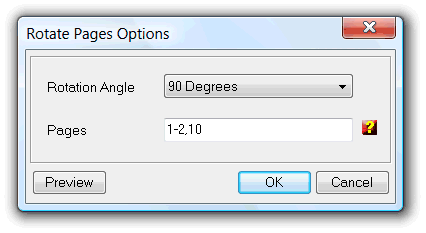
「Rotation Angle」には、適用したいページの回転角度を登録します。
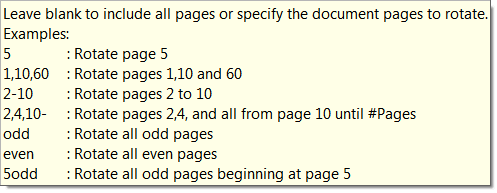
下段の「Pages」の入力欄では、回転操作の対象としたいページを指定できます。無指定の場合は、全てのページを回転させます。特定のページだけを回転させたい場合は、以下の形式で指定して下さい。:
| 機能名: | Rotate |
| オプション: | [] は、任意のパラメータを意味します。 |
| [Angle=] | Angle of rotation to apply. Support 90,-90 and 180 values only. Default equal to 90 degrees |
| [Pages=] | List of pages to rotate, see above examples for supported definitions rules. Default to all pages. |
| [-s] | - Silent mode. Run without showing the interface (only available for licensed users) |
| fileslist | - List of PDFs to rotate; Separate files using the semicolon ";" char. Must be the last parameter |
| 例: Rundll32 "c:\Program Files\PDF-ShellTools\PDFShellTools.dll",Rotate Angle=180 Pages=1-5,7 -s *.PDF |
|